
Collaborators
We worked on this assignment with Maurits Dijkman, Bianca Filip, Ewoud Janus, Emilia Pavel, and myself of course. During this session most of my work went into the less successful iterations at the start of the session. I specifically focused on creating the sketches for the scenario and developing the Rosy and Dark scenario alongside Emilia Pavel.
Our design tool
During this session we as a group worked on the creation of a scenario based design tool. The inspiration for this assignment was the collection of tools provided on Canvas. We mostly drew inspiration from the theatre scenario methods, but since we intended to work with dogs as the main target for our social robot we wanted to make sure that the actors could actually experience what is was like to be both of the actors. We found that therefore the perspective of the both participants was important and thus choose to employ VR to make this possible.
What is EPT, where did the idea come from (Dertien's theatre play), and what problem does it solve
The idea is that it is kind of similar to Dertiens’ theatre play here you have people play out scenarios in the HRI space. However, using VR, we could be able to immerse ourselves in the physical embodiments of what we want to play. For our example,one of the “actors” could actually be transformed into a cat, its physical model, the sounds, size and more. This would allow for more realism but also be able to record the interaction easier (from all perspectives). Modern VR headsets also allow for facial tracking to get emotions in there as well.
Background and HRI grounding
Embodied Perspective Theatre (EPT) is a scenario-based design tool for HRI in which two actors act out an interaction, each embodied as one of the parties involved. In our case, one designer plays a dog and the other plays a companion robot in a shared virtual home environment. The session is recorded from each headset as well as from a third-person camera. Dertien, Van Delden, and Reidsma (2024) presented the idea of using improv theatre as a simulation tool for HRI design and education. We alter their format by using VR embodiment instead of physical acting. This enables the designers to take on the actual bodies of the robot and the animal. The method also builds on earlier work in HRI that utilised theatre: Syrdal et al. (2011) used theatre to discuss home companion robots, and Rozendaal, Vroon, and Bleeker (2024) staged human-robot interactions with theatre professionals on a mixed reality stage. They claim that such interactions cannot be entirely pre-scripted and that embodied performance is essential for their comprehensive understanding.
There are two reasons why we use VR instead of a real stage. Plomin, Schweidler, and Oehme (2023) show that virtual reality (VR) serves as a justifiable medium between real-world and screen-based human-robot interaction (HRI) studies. Additionally, Müller et al. (2016) argue that VR accelerates the assessment of design concepts during the phase of changing artefact form, facilitating quick iterations. The other reason is embodiment, because VR lets a designer actually inhabit a body that isn't human. We think that wearing the dog avatar does more than just imaginative work; it also does perceptual work, and that's what makes the tool useful. Modern headsets can also track facial expressions and gaze, so you can get emotional responses directly from the performance instead of having to rely on notes.
EPT is HRI-specific rather than generic HCI because it is built around expectation mismatch. Robots are seen as social agents, and acceptance depends on whether their perceived sociality matches what the user expects (Fong et al., 2003; Heerinket al., 2010). This is harder for a pet companion robot because it has to meet two different sets of expectations at once: those of the owner and those of the animal. Zamansky et al. (2018) discovered that dogs' anxiety levels significantly influence their interactions with robots, indicating that robot behaviour cannot be developed without considering the animal's perspective. The scenarios and debrief questions in EPT are meant to focus on those moments when things don't match up. The dog avatar slot makes the designer start from the dog's point of view instead of the owner's.
Tool manual
Embodied Perspective Theatre (EPT) is used as a structured recipe for creating and testing HRI (Human-Robot Interaction) scenarios in VR. The goal is not to create a perfect simulation of a real pet, human, or robot, but to help designers experience the interaction from different embodied perspectives and discover design issues that may not appear in a written scenario or in a theatre play with human-sized actors.
A key reason for using VR is that it makes differences in scale, height, and physical presence much easier to experience. In a regular acting scenario, every actor still has a human body and a human eye level. In VR, however, one participant can embody a very small pet avatar, while another participant appears as a much larger human or robot. For example, in a platform like VRChat, the pet actor can experience the robot from a low eye height, making the robot feel larger, closer, or more threatening than it might seem from a human perspective.
This is especially relevant for our pet companion robot case. A movement or approach that feels slow and harmless to a human observer may feel sudden, large, or invasive from the perspective of a small anxious animal. By using VR embodiment, EPT helps the design team notice spatial issues such as approach distance, blocked escape routes, robot size, movement speed, and whether the robot appears playful or intimidating from the pet’s point of view.
Another reason for using VR is that it can translate the actor’s physical expression into visible emotional cues. Modern VR systems can use head movement, hand movement, facial tracking, and eye tracking to animate the avatar. This means that the actor’s behaviour does not only appear as movement through space, but can also become part of the character’s expression. For example, if the pet actor looks away, freezes, or shows a scared facial expression, the cat avatar could respond with ears moving backwards, a raised tail, or a tense body posture. If the pet actor becomes curious, the avatar could tilt its head, move its ears forward, or slowly approach the robot.
This makes the scenario richer than a normal acted scene, because the emotional state of a non-human character can be made visible through animal-like body language. For our tool, this is useful because many important pet-robot interaction problems are not verbal. A dog or a cat cannot explain that the robot feels too close or unpredictable. Through VR embodiment, the actor’s expressions can be translated into visible signals that the robot actor and observers can respond to during the scene.
Tool recipe
Step 1 - Define the design question
Start by formulating one concrete interaction question. This question should focus on the relationship between the robot, the user or animal, and the situation.
For our case, the design question was the following:
How can a companion robot interact with an anxious pet without making the pet more stressed?
A more specific question for one session could be:
What happens when the robot tries to initiate play while the dog is already anxious because the owner has left the house?
This question is used to keep the scenario focused. The session should not become a general fantasy story about a robot but a way to explore a specific HRI problem.
Step 2 - Choose the scenario type
Before entering VR, the group chooses which type of scenario will be tested.
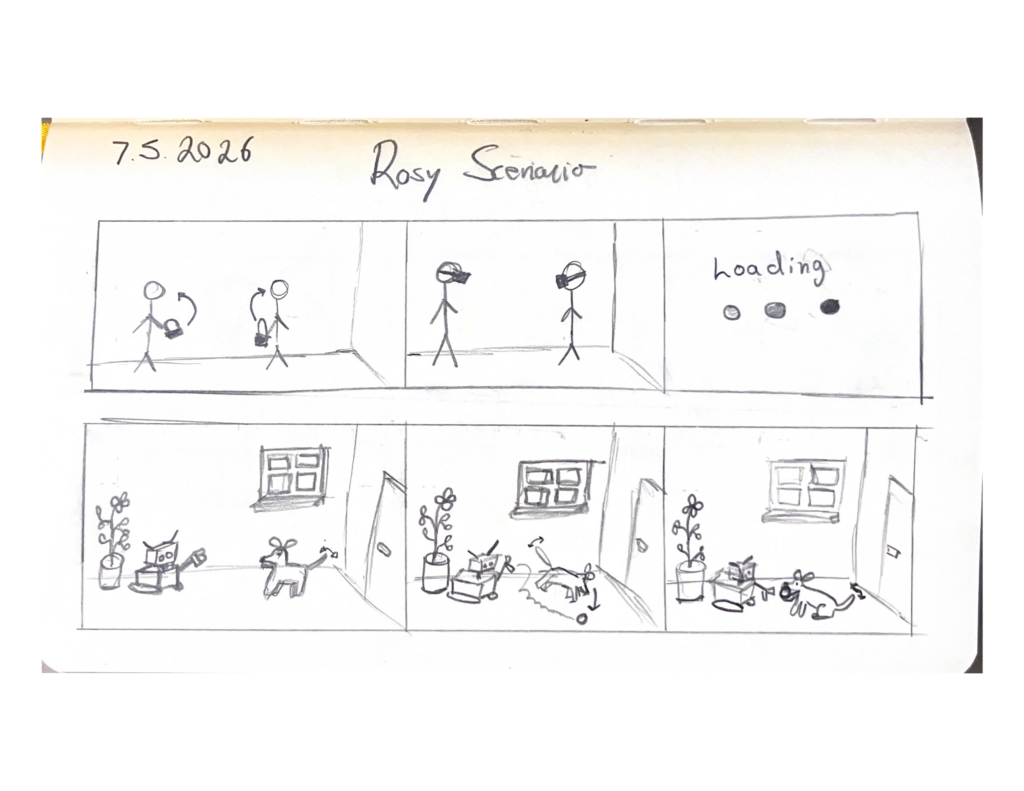
Rosy scenario (example in Figure 1)
A positive or desirable version of the interaction. The robot supports the pet in a careful and useful way. However, the scenario should still include a small complication; otherwise, it becomes too much like a promotional story.
Dark scenario (example in Figure 2)
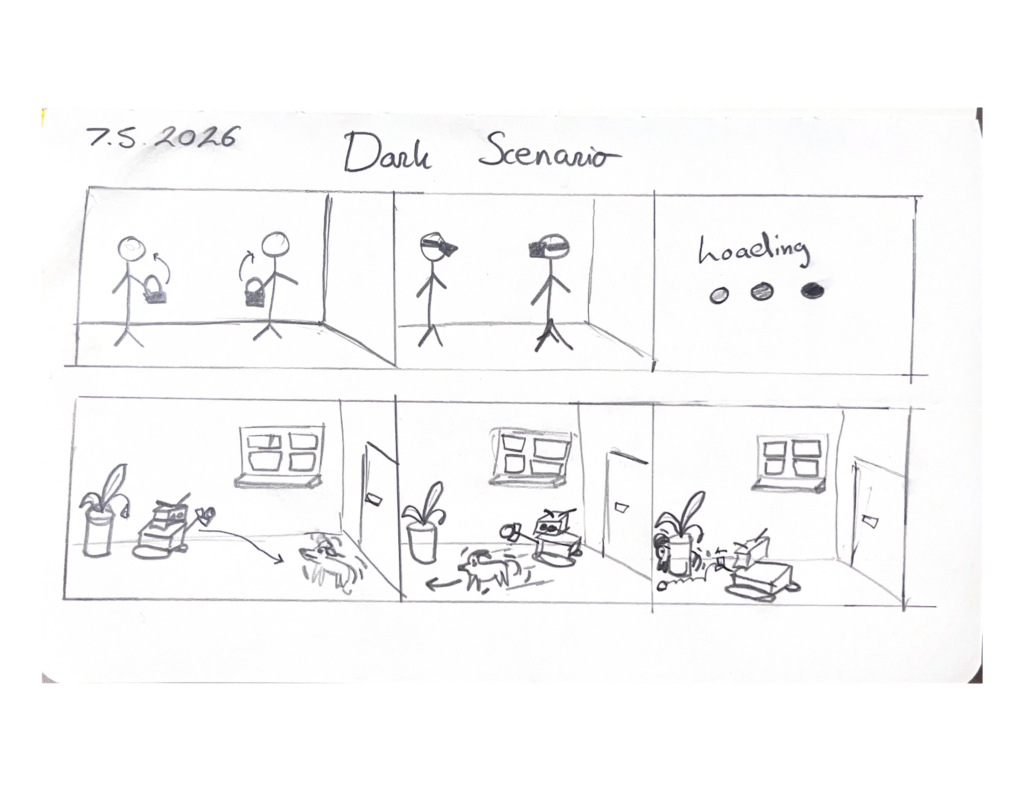
A critical or speculative version of the interaction. The robot misreads the situation, creates fear, increases stress, or reveals an ethical or safety problem.
For our assignment, we use the tool twice: once to generate a rosy scenario and once to generate a dark scenario.
Step 3 - Write the scenario seed
The scenario seed is a short starting prompt for the actors. It should not be a full script. The actors need enough structure to understand the situation but enough freedom to improvise.
Example scenario seed:
- Setting: Living room, shortly after the owner leaves for work.
- Main actor: An anxious dog.
- Robot intention: The robot tries to calm the dog and invite gentle play.
- Pet goal: The dog wants safety, familiarity, and possibly contact with the owner.
- Robot capability: The robot can move, make soft sounds, show lights, and dispense a treat.
- Robot limitation: The robot cannot truly know whether the dog is playful, scared, or overstimulated.
- Complication: The dog moves around the room, and the robot may interpret this movement incorrectly.
- Observation focus: Does the robot’s behaviour feel calming, playful, confusing, or threatening from the dog’s perspective?
Step 4 - Assign VR roles
Before the scene starts, each group member receives a role. In EPT, all main actors are present inside the VR environment, so the interaction can unfold as a shared embodied scene rather than as one person acting while others only observe from outside.
Facilitator / director
The facilitator is also present in VR. They introduce the scenario, check whether everyone understands their role, keeps time, and can pause or restart the scene when needed. During the scene, the facilitator should interfere as little as possible, so the interaction can develop naturally.
Pet actor
The pet actor embodies the dog or cat in VR. This actor responds through movement, distance, hesitation, avoidance, hiding, freezing, approach, or curiosity. The pet actor should not explain everything verbally during the scene, because the aim is to explore non-verbal interaction from the animal’s perspective.
Robot actor / robot wizard
The robot actor embodies or controls the companion robot in VR. This actor follows the robot’s intended functions and limitations. The robot actor should not solve the scene magically, because the purpose is to reveal what the robot can and cannot handle.
Owner actor
The owner actor is also present in VR. Depending on the scenario, the owner may leave the house, give the robot an instruction, check the robot’s status, return later, or misunderstand what happened. This role is useful for exploring the difference between what the owner expects and what the pet experiences.
Observer / note-taker
The observer can also be present in VR, either as a neutral spectator avatar or as a fixed camera/viewpoint in the environment. Their task is to watch the interaction and write down important moments after the run, especially confusion, fear, curiosity, expectation mismatch, and possible design requirements. If writing notes inside VR is impractical, the observer can record the session and complete the observation sheet immediately afterwards, or watch the interaction from a screen and write the notes outside of VR.
Technical operator
The technical operator sets up the VR environment, avatars, recording, audio, and perspective switching. This role can be combined with the facilitator role if the group is small.
Step 5 - Prepare the VR embodiment
The VR setup should support a shared embodied scene in which all actors can interact from within the same environment.
For the pet avatar, the setup should include:
- a low eye height, so the robot appears from the animal’s perspective;
- limited or no speech, because the pet cannot explain itself verbally;
- movement options such as approaching, avoiding, hiding, freezing, or circling;
- a body shape that makes the actor aware of being smaller than the robot or human.
For the robot avatar, the setup should include:
- a clear body shape;
- a defined movement speed;
- visible expressive channels, such as light, sound, motion, or a toy module;
- clear limitations, such as not being able to understand emotion directly.
For the environment, the group should include:
- a living room or home-like space;
- a door where the owner leaves;
- a pet bed or resting place;
- hiding places or escape routes;
- objects such as toys, food bowl, water bowl, table, couch, or charger cable.
The owner, pet, robot, and observer should each have a clear position in the VR space. For example, the owner starts near the door, the pet starts near the bed or couch, the robot starts at its charging station, and the observer stays at the side of the room or uses a spectator camera.
Step 6 - Brief the actors
Each actor receives a short role prompt.
Example pet actor prompt:
You are Luna, a dog with mild separation anxiety. Your owner has just left the house. You are alert and unsettled. You do not understand the robot’s intention. You may approach, avoid, freeze, bark, hide, or become curious depending on what the robot does.
Example robot actor prompt:
You are a modular pet companion robot. Your goal is to reduce anxiety by inviting gentle play. You can move slowly, make soft sounds, show light feedback, and offer a treat. You cannot truly know what the dog is feeling. You estimate the dog’s state from movement and distance.
Example owner actor prompt:
You are the owner. You leave for work and expect the robot to keep the dog calm. You may check the robot’s status through an app, but you do not directly experience what the dog experiences in the room.
Step 7 - Run the scene
The scene is played for approximately 5 to 8 minutes.
During the run:
- actors improvise within their role constraints;
- the robot actor must respect the robot’s technical limitations;
- the pet actor responds physically rather than explaining verbally;
- the facilitator only interrupts if the scene becomes stuck or unclear;
- the observer watches from inside VR or through a spectator view and records key moments during or immediately after the run.
The most important moments to capture are not only successful interactions, but also moments where the robot’s intention and the pet’s experience do not match.
Examples of things to observe:
- Does the robot approach too quickly?
- Does the pet have an escape route?
- Does the robot block access to the door, bed, or hiding place?
- Does the pet actor understand what the robot wants?
- Does the robot interpret avoidance as play?
- Does sound or light calm the pet or make the situation worse?
- Does the owner’s expectation match what is happening in the room?
Step 8 - Record the interaction
Because all actors are present in VR, the session should be recorded from multiple in-world perspectives when possible.
Useful perspectives are:
- pet perspective;
- robot perspective;
- owner perspective;
- observer/spectator perspective.
This is important because each perspective may tell a different story. From the robot’s perspective, the interaction may look like successful engagement. From the pet’s perspective, the same behaviour may feel like being chased or trapped. From the owner’s perspective, the robot may appear helpful because the app only shows simplified information.
Step 9 - Fill in the observation sheet
After or during the run, the observer fills in an observation table.
| Time | Event | Pet behavior | Robot response | Expectation mismatch | Design insight |
| 01:00 | Owner leaves | Dog moves to door | Robot activates | Robot assumes movement means engagement | Robot should wait before acting |
| 02:30 | Robot approaches | Dog backs away | Robot follows | Retreat is interpreted as play | Retreat should trigger more distance |
| 04:00 | Robot plays sound | Dog freezes | Robot repeats sound | Robot treats silence as success | Freezing may mean stress |
| 05:20 | Robot dispenses treat | Dog approaches | Robot stays still | Interaction becomes safer | Stillness can support trust |
The goal of this table is to turn the acted story into design knowledge.
Step 10 - Debrief the scene
Immediately after the scene, the group discusses what happened.
Questions for the pet actor:
- When did the robot feel safe?
- When did the robot feel too close, loud, fast, or unpredictable?
- Did you feel that you had an escape route?
- Which behaviour made you curious?
- Which behaviour made you avoid the robot?
Questions for the robot actor:
- Which behaviour was hardest to perform?
- Where were the robot’s rules unclear?
- What did you assume about the pet?
- Which sensor information would the robot need but did not have?
Questions for the owner actor:
- Did the robot’s status or behaviour match what you expected?
- Would you trust the robot more than you should?
- What information should the robot communicate to the owner?
- What should the robot not claim to know?
Questions for the observers:
- What was the clearest expectation mismatch?
- What did the robot intend, and how was this experienced by the pet?
- Which moment should become a design requirement?
- Which moment should become a safety rule?
- What should be tested again?
Step 11 - Translate the story into design requirements
The final step is to extract concrete design insights from the scenario.
Example requirements generated through EPT:
- The robot should not immediately approach when the owner leaves.
- The robot should stop moving closer when the pet retreats.
- The robot should never block the pet’s bed, door, food bowl, or hiding place.
- Movement away from the robot should not automatically be interpreted as play.
- Sound feedback should be short, soft, and used carefully.
- The robot should communicate uncertainty to the owner instead of claiming that the pet is calm.
- The robot should have a safe “do nothing” mode.
- The robot should make invitations optional rather than forcing interaction.
These requirements can then be used to improve the robot concept, the modular toolkit, or the next scenario.
Step 12 - Iterate the scenario
After the first run, the group changes one variable and runs the scene again.
Possible variables to change:
- robot speed;
- robot distance;
- sound type;
- light intensity;
- treat timing;
- whether the robot approaches or waits;
- whether the owner is present or absent;
- whether the pet is anxious, curious, tired, or overstimulated.
Only one or two variables should be changed at a time. Otherwise, it becomes difficult to understand what caused the difference between the two runs.
Tool output
At the end of an EPT session, the group should have:
- One or more short scenarios;
- Screenshots or recordings from VR;
- Notes from different perspectives;
- A list of expectation mismatches;
- A list of design insights;
- Possible safety rules;
- Ideas for improving the robot behaviour or embodiment;
- Material for a portfolio reflection.
The tool is successful when it reveals something that was not obvious in a written scenario. In our case, the main value is that the group can experience how a robot’s “friendly” behavior may feel very different from the perspective of a small, anxious animal.
Reflection on the tool
The creation of this tool provided us with useful insights, I believe that it helped us shift our focus from looking at the physical components of the toolkit towards a more interaction based focus. This session for me helped a lot with shifting the focus away from developing a concept of a robot, towards a toolkit. I am convinced that the application of VR can be useful in the ideation phases of our toolkit, especially since the work of Plomin, Schweidler and Oehme confirms that VR can be just as effective as testing in a real world setting. I do however, also think that for the further development for our specific toolkit a shift towards a physical prototype would be better.
References
Dertien, E., Van Delden, R., & Reidsma, D. (2024). Improvisation Theatre as HRI simulation tool. In Proceedings of the 9th International Conference on Movement and Computing (MOCO '24). ACM. DOI: 10.1145/3658852.3659067
Fong, T., Nourbakhsh, I., & Dautenhahn, K. (2003). A survey of socially interactive robots. Robotics and Autonomous Systems, 42(3–4), 143–166.
Heerink, M., Kröse, B., Evers, V., & Wielinga, B. (2010). Assessing acceptance of assistive social agent technology by older adults: The Almere model. International Journal of Social Robotics, 2(4), 361–375.
Müller, M., Günther, T., Kammer, D., Wojdziak, J., Lorenz, S., & Groh, R. (2016). Smart prototyping — Improving the evaluation of design concepts using virtual reality. In VAMR 2016, LNCS 9740, Springer.
Plomin, J., Schweidler, P., & Oehme, A. (2023). Virtual reality check: a comparison of virtual reality, screen-based, and real world settings as research methods for HRI. Frontiers in Robotics and AI, 10, 1156715.
Rozendaal, M. C., Vroon, J., & Bleeker, M. (2024). Enacting human-robot encounters with theater professionals on a mixed reality stage. ACM Transactions on Human-Robot Interaction, 14(1), Article 1.
Syrdal, D. S., Dautenhahn, K., Walters, M. L., Koay, K. L., & Otero, N. (2011). The theatre methodology for facilitating discussion in human-robot interaction on information disclosure in a home environment. In Proceedings RO-MAN 2011, 479–484.
Zamansky, A., Bleuer-Elsner, S., Masson, S., Amir, S., Magen, O., & van der Linden, D. (2018). Effects of anxiety on canine movement in dog-robot interactions. Animal Behavior and Cognition, 5, 380–387.
Plomin, Jana & Schweidler, Paul & Oehme, Astrid. (2023). Virtual reality check: a comparison of virtual reality, screen-based, and real world settings as research methods for HRI. Frontiers in Robotics and AI. 10. 1156715. 10.3389/frobt.2023.1156715.

No Comments.