
Collaborators
We worked on this assignment with Maurits Dijkman, Bianca Filip, Ewoud Janus, Emilia Pavel, and myself of course. This session was also very much done in a collaborative effort, where I believe no parts to be specifically performed by exclusively one person. During the session I contributed with general debugging, puppeteering the robot through the manual movement and the MIDI controller. I also helped shape the animations, but once again it was a definite group effort.
Technical setup
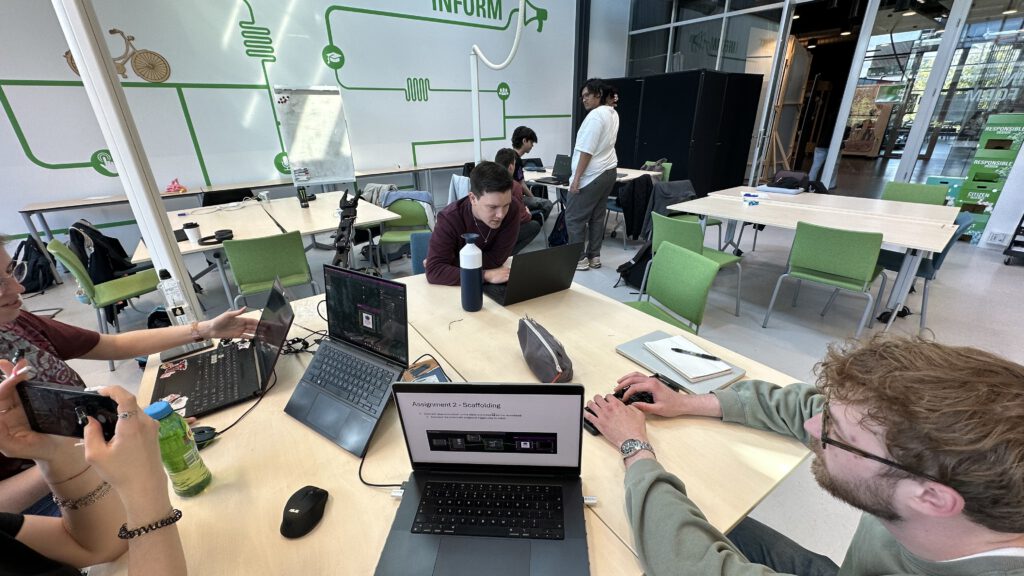
Figure 1 displays the setup that we got to work with for this session. We were working with the following items:
- SO-ARM101 an open-source robot arm.
- TouchDesigner which is the software used to control the robot.
- MIDI controller which allowed us to control the different joints of the robot.
- Instruction slides, containing the tutorial we would have to follow for this session.
Assignments
Assignment 1 - Familiarization
Assignment 2 - Scaffolding
Assignment 3 - Recording
Assignment 4 - Retargeting
Happy vs Sad
The animation you see in Video 5 is supposed to convey happiness. We tried to accomplish this by creating relatively quick movements with a lot of open movement, showing that the robot is excited to start its interaction. We anthropomorphized the claw of the robot as a sort of beak from a bird.
The animation in Video 6 is supposed to convey that the robot is sad. The claw is mostly closed, the movements are slow. The robot is trying to make itself as small as possible to hide itself from the world, signaling that it is depressed and sad.
Structured Observation
The tutorial we had to follow was broken up into four individual stages. Each step or assignment in the tutorial introduced more concepts and layers to the robots control scheme. Which would allow us to explore the different capabilities of the software and the robot arm.
In the familiarization step of the assignment we were guided through setting up the robot, connecting the robots joints to six sliders on the MIDI controller, giving us direct and basic control over the joints. Because this input was too direct and simple it was difficult to convey any strong expression with the arm.
For the scaffolding part of the tutorial we were assigned with connecting the happy and sad demonstration that was included in the tutorials TouchDesigner file. This allowed us to test the a few of the layered structures we would be working with, an expressive overlay routed through and overlapping with the control of the head tilt. We were only able to display the sad emotion when we added more joints to the MIDI controller, namely the opening and closing of the gripper and the angle of the head. Although it did effectively convey the sad emotion through scaffolding, it was still limited to the tutorials animation.
When we got to the step of record we were able to get more of our own custom expression into the robot. To record our own animations through puppeteering we had to disable the torque on the motors through TouchDesigner, and connect the motor angle outputs to the record module. After starting the recording by pressing an assigned button on the MIDI controller, we could start puppeteering the robot. We tried to convey anticipation according to Disney's twelve animation principles created by Thomas and Johnston.
In the final step of the tutorial we worked on retargeting, in this step we were tasked with starting the previously made animation from a different starting point. Combining the pre-recorded animation with manual control during the execution of said animation. This part of the session allowed us to see the principles of "follow-through" and "secondary action", showing that scripted and manual controlling of the robot could happen at the same time in a smooth manner.
Reflection, applicability and HRI grounding
For me the most interesting insight that I got from this session was that one can convey emotions through very subtle movement of the robot arm. The expression of the robot did not happen in a static manner, but rather through the transitions between the different poses. When changing the transition between two identical poses, one could convey a completely different emotion. While using the Laban framework was useful in providing basic emotions, it did not prove entirely useful when trying to perform a more mixed set of expressions. I also found that the easiest way for us to create emotions was through puppeteering the arm and recording the motion, this is however very susceptible to our bias and our interpretation of how the robot looked.
References
F. Thomas and O. Johnston, The illusion of life: Disney Animation. Disney Press, 1995.

No Comments.